Time to read: about 5 minutes. Time to try: about 5 minutes.
If you have been putting off AI because it sounds like tutorials, setup, and “being good with computers,” this is for you.
You do not need to learn AI first. You just need five minutes and the ability to write an email.
AI helpers are not search engines. They are responsive tools you can talk to. They keep track of what you said, rephrase when you are confused, and suggest what to ask next when you are stuck. They do not understand things the way a person does, but they are very good at organizing information and wording it so it makes sense to you.
This article gives you one plain-language prompt and two real ways to use it.
The 5-minute recipe
Step 1: open an AI helper.
Open any capable AI model in your browser or app. Examples include:
- ChatGPT (chat.openai.com)
- Claude (claude.ai)
- Gemini (gemini.google.com)
- DeepSeek (chat.deepseek.com)
- Qwen (chat.qwenlm.ai)
- Ernie (yiyan.baidu.com)
Most offer a free tier that is enough to try this recipe. If you already have one open, use that.
Step 2: copy and paste the prompt.
Copy this prompt, paste it into the message box, and answer the first question.
I want to try using you as a thinking partner for one small everyday problem.

Start by asking me one clear question to understand what I want. After I answer,
suggest 2–3 useful directions and ask me the next best question.

Rules for this conversation:
- Use plain, practical language. Avoid jargon.
- If you are unsure about a fact, say so. Do not guess.
- If I paste a document, explain what it says in simple terms and point out
  anything I should double-check.
- If I seem stuck, suggest one concrete thing I could ask you next.
- If I want to change the topic, just follow me.

After five back-and-forth messages, wrap up with a short summary and stop.
That is the recipe. Describe what you want and follow the conversation.
Point C1 A single starter prompt that works in any capable AI helper is more effective for onboarding non-technical users than a feature list or vendor tutorial.
Before you paste anything personal
When the examples below show a bill or notes being pasted into an AI, the private details have been removed first. Before you paste your own documents, take out:
- Account numbers and customer IDs
- Full addresses
- Real names (use Person A, Person B)
- Phone numbers, email addresses, bank details
You do not need exact account numbers for the AI to explain a bill.
Example 1: “Explain this utility bill to me”
This shows the AI helper as a plain-language tutor.
You: [pastes the recipe prompt]
AI: What is the everyday problem you would like help with?
You: I got a utility bill and I do not fully understand the charges.
AI: Please paste the bill text, and I will explain it.
You: [pastes a fictional utility bill with account number removed]
Billing Period: 01-JUN-2026 to 30-JUN-2026
Due Date: 15-JUL-2026
Energy Charges (EC)          ₹980.00
Fixed Charges (FC)           ₹150.00
UDC                          ₹ 65.00
Regulatory Surcharge         ₹ 45.00
Total Amount Due            ₹1240.00
AI: Here is the bill in plain language:
- Billing period: 1 June to 30 June
- Total due: ₹1,240 by 15 July
- Energy Charges (EC): ₹980 — what you paid for the electricity you used.
- Fixed Charges (FC): ₹150 — the basic meter cost, usually the same every month.
- UDC: ₹65 — I am not sure what this abbreviation stands for on your bill. Check the back of the bill or call your provider to confirm.
- Regulatory Surcharge: ₹45 — a government or regulator-mandated fee.
Would you like me to explain any charge in more detail, or show you what happens if the payment is late?
 The animation shows the conversation above: the reader asks for help with a
utility bill, pastes the charges, and the AI explains each line and offers
follow-up questions.
The animation shows the conversation above: the reader asks for help with a
utility bill, pastes the charges, and the AI explains each line and offers
follow-up questions.
The AI pulled out the pieces that matter, admitted when it did not know what “UDC” meant, and offered sensible next questions.
Point C2 The AI helper itself can act as the tutor, so newcomers do not need to study AI before they start using it.
Point C3 Suggesting the next question or direction after each answer removes the blank-page problem and keeps the experience practical rather than instructional.
Example 2: “Turn these meeting notes into useful outputs”
This shows how the helper can do several tasks at once.
Imagine you have rough notes from a meeting. Normally you would re-read them, write a follow-up message, and make a task list. With the recipe prompt, you can ask for all three in one go.
You: I have rough meeting notes. I want a short summary, a follow-up email, and a list of action items with who does what.
AI: Please paste the notes.
You: [pastes anonymized notes]
Attendees: Me, Person A, Person B
- Website needs new contact form by Friday
- Person A will check hosting prices
- Person B will send logo files by Wednesday
- Next meeting on Monday 10 AM
AI: Here are three useful outputs:
Summary: We agreed the website needs a new contact form by Friday. Person A will check hosting prices, Person B will send the logo files by Wednesday, and we will meet again on Monday at 10 AM.
Follow-up email:
Hi Person A and Person B,

Thanks for the meeting. Here is what we agreed:

- I will work on the new contact form by Friday.
- Person A, please check hosting prices and share what you find.
- Person B, please send the logo files by Wednesday.

Let us meet again on Monday at 10 AM.

Thanks,
[Your name]
Action items:
| Task | Owner | Deadline |
|---|---|---|
| Build contact form | Me | Friday |
| Check hosting prices | Person A | By Thursday |
| Send logo files | Person B | Wednesday |
| Next meeting | Everyone | Monday, 10 AM |
One input, three useful outputs.
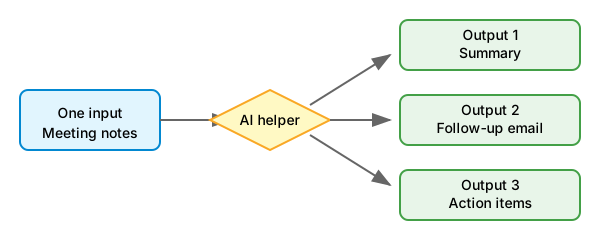
Point C4 Two short annotated examples are enough to teach the pattern: one showing the AI explaining something confusing, and one showing it doing several useful tasks from a single input.
This is not Google, and it is not an old chatbot
| Old way | What it feels like |
|---|---|
| Search engine | You get links and do the reading and sorting yourself. |
| Old chatbot | You ask one question and get one narrow answer. |
| AI helper | You describe a goal, and it works through the problem with you. |
Google is great for finding web pages. An AI helper is better when you want to do something with information specific to you.
Three more places to try it
- School: Paste messy notes and ask for a study plan.
- Creative projects: Describe an idea and ask for an outline.
- Small work tasks: Paste a long email and ask for a reply, summary, and action items.
The recipe stays the same. Only the topic changes.
Three safety rules
AI helpers are useful, but they are not perfect. Keep these three rules in mind:
- Verify facts. If the AI gives you dates, amounts, or medical, legal, or financial advice, double-check it elsewhere.
- Remove or replace personal details before pasting. Do not paste passwords, full addresses, bank details, or private health information. Replace real names with placeholders like Person A.
- Keep a human in the loop for big decisions. The AI can help you think, but you are still the one who decides.
Slow down and double-check when the AI is talking about money, health, law, or people. If something feels off, ask: “Are you sure?” or “What should I double-check here?”
Your turn
Open any AI helper you have access to. Paste the starter prompt. Pick one small problem—perhaps a bill you do not fully understand or notes you need to turn into an email. Answer the first question the AI asks you.
That is it. You have started.
If you want a one-page reminder you can keep next to your screen, download the printable first-conversation card.
When you are ready for the next step, read “Beyond the First Conversation: Advanced Questions for New AI Agent Users”.
Article guideImportant points and sources4 pointsShow guideHide guide
- C001core · medium-high · verifiedA single model-agnostic starter prompt is a more effective onboarding artifact for non-technical users than a feature list or vendor tutorial.
- C002core · medium-high · verifiedThe AI agent itself can act as the tutor, so newcomers do not need to study AI before they start using it.
- C003argument · medium · verifiedSuggesting the next question or direction after each answer removes the blank-page problem and keeps the experience experiential rather than instructional.
- C004design · medium · verifiedTwo short annotated transcripts are enough to teach the pattern: one proving intelligence through document explanation, and one proving productivity through one-input-multiple-outputs automation.
SourcesSources used3 sourcesShow sourcesHide sources
- OpenAI: What can ChatGPT do?product
- Anthropic: Claude capabilitiesproduct
- Google: Gemini overviewproduct
Look closer
Sources and notes
Open detailsClose details
Look closer
Sources and notes
These notes collect the sources, counterpoints, and review status behind the article's important points. Read the essay first; open this when you want to check something.
Confidence reflects how strongly the sources support the point (low / medium / high). Status describes the point's role (e.g., core, argument, landscape). Sources link to supporting material;counterpoints note boundary conditions or conflicting findings.
A single model-agnostic starter prompt is a more effective onboarding artifact for non-technical users than a feature list or vendor tutorial.
verifiedreviewed 2026-07-18
- Sources (1)
“ChatGPT can answer questions, help with writing, analysis, coding, and many other tasks through conversation.”
OpenAI: What can ChatGPT do?background
- Counterpoints (1)
Some users may still prefer structured tutorials or video walkthroughs depending on learning style.
The AI agent itself can act as the tutor, so newcomers do not need to study AI before they start using it.
verifiedreviewed 2026-07-18
- Sources (1)
“Claude can assist with analysis, writing, coding, math, and answering questions across many domains.”
Anthropic: Claude capabilitiesbackground
- Counterpoints (1)
Basic digital literacy and an understanding of when to verify facts are still prerequisites for safe use.
Suggesting the next question or direction after each answer removes the blank-page problem and keeps the experience experiential rather than instructional.
verifiedreviewed 2026-07-18
- Sources (1)
“Gemini can engage in multi-turn conversations and help users explore topics iteratively.”
Google: Gemini overviewbackground
- Counterpoints (1)
The effectiveness depends on the quality of the starter prompt and the user's willingness to engage.
Two short annotated transcripts are enough to teach the pattern: one proving intelligence through document explanation, and one proving productivity through one-input-multiple-outputs automation.
verifiedreviewed 2026-07-18
- Sources (1)
“Conversational AI can summarize, explain, and draft content from user-provided inputs.”
OpenAI: What can ChatGPT do?background
- Counterpoints (1)
Two examples may not cover all reader contexts; additional examples may be needed after reader feedback.
Review recordHow this was madeShow detailsHide details
Created 2026-06-26 by human. Policy: policy:default v1.0.0.
Researched, drafted, and structured with AI agents; approved for publication by a human reviewer.
✓ Approved hash matches current article
Reviews
- agentapproved2026-06-26
Scope: claims, tone, privacy, scope
contentHash:
f9987826579f1516…Sibling-agent review against article-proposal-ideation eval-card. Privacy scan passed. No proprietary or personal content detected.
- humanapproved2026-06-26
Scope: thesis, examples, tone, safety
contentHash:
f9987826579f1516…Human author approved the draft and assets for review publication.
Machine-readable files
The same points, sources, and relationships are also available as structured files for agents and tools. The JSON follows thepublication record schema.